
Create your first project
The first project is the working boundary for your evaluation. It is the place where your team will keep launches, test cases, dashboards, collaborators, and integrations, so it should represent a real team or product area rather than a temporary bucket of example data.
Decide what the first project represents
- one product or service;
- one team-owned area;
- one slice of work that the same people will review together.
Also decide whether the project should be private by default. For more on that choice, see Project access and visibility.
Who can create it
Any member with the global Admin or User role can create a project.
Steps
Open the Allure TestOps home page.
Click + Project.
In the dialog that appears, enter the Name of your project.
Optionally, enter a Description for the project and specify a two-letter Abbreviation, which will be displayed on the project icon.
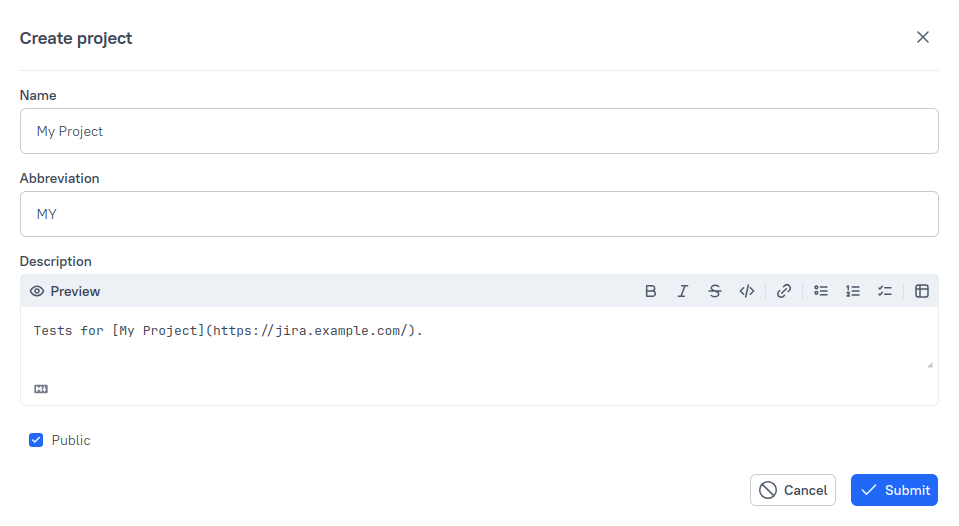
If you want to make the project visible to all users of your instance, turn off the Private project toggle.
For more information, see Project access and visibility.
Click Create.
What happens next
- Invite users to the instance if teammates do not yet have accounts.
- Add collaborators to the project if everyone already has an account.
