
Allure TestOps architecture
An Allure TestOps installation is not only the TestOps application. A usable deployment also needs database, queue, session, and artifact-storage services that match the workload you expect to process.
Required platform components
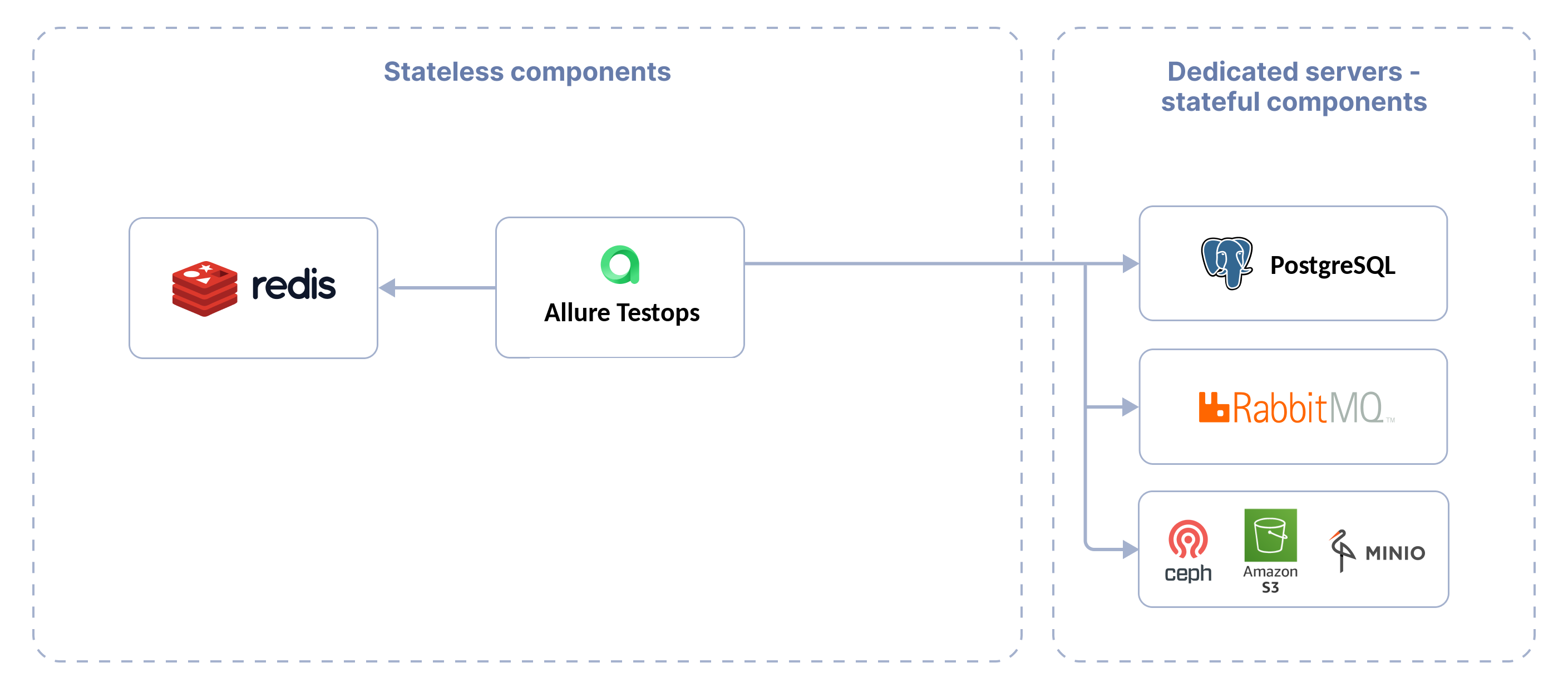
An Allure TestOps installation includes the Allure TestOps service itself and several third-party services:
stateful components:
- PostgreSQL database server;
- RabbitMQ message server;
- S3-compatible storage server, such as Ceph or MinIO.
For a production environment, these services must be deployed separately from the Allure TestOps service.
stateless components:
- Allure TestOps service itself;
- Redis server for storing user sessions.
These services can be deployed on the same machine. Depending on the installation method and the configuration, Redis can be deployed and pre-configured automatically.
End users should only communicate with the Allure TestOps service, optionally through a reverse proxy. The other components must be reachable from TestOps over the network but should not be exposed directly to end users. For the ingress boundary, see Network and HTTPS.
Hardware requirements
The optimal hardware configuration depends on the workload. For a small project, start with 4 vCPU and 8 GB of RAM, then validate and scale up based on launch volume, artifact size, and the number of tests you process each day.
Currently supported operating system versions for installing Allure TestOps using:
- DEB packages — Ubuntu versions 20.04 LTS, 22.04 LTS or 24.04 LTS;
- RPM packages — CentOS 8 and above or RedHat Enterprise Linux 8 and above.
Storage requirements
Database
Currently supported PostgreSQL versions — 15 and higher. When using database below version 15, the application will fail to start.
Allure TestOps relies on PostgreSQL as the main data storage.
The required disk space depends on the amount of test results you process. A
project with 100,000 tests can take about 300 GB in PostgreSQL after one
year of daily runs.
For acceptable performance of the whole system when processing test results from automated tests, especially if your test base is big and runs occur several times a day, you need to meet the following requirements:
- Use only SSDs as the database storage, preferably enterprise-grade. HDDs will slow down the services.
- Configure the database correctly for proper SSD performance, as described in our manual.
- The database should not be stored on the same disk as the artifact storage. This will create resource contention and ultimately slow down both the database and the storage.
Object storage
Object storage holds test result artifacts and test case attachments such as
screenshots and videos. The required capacity depends on the tests you run. For
a small project, start with at least 50 GB and scale up as artifact volume
grows.
For acceptable performance of the whole system for the processing of the test artifacts from automated tests, you need to meet the following requirements:
- Use only SSDs as the data storage for artifact storage, preferably enterprise-grade. HDDs will slow down the services.
- Use any S3-compatible storage:
- If you use Kubernetes, you can also connect a storage using a CSI driver.
- Use a standard storage class designed for frequent data access. Using "cold" storage classes can negatively affect overall Allure TestOps performance.
- Artifact storage should not be stored on the same disk as the database. This will create resource contention and ultimately slow down both the database and the storage.
Message queue
A RabbitMQ message queue server is used internally by Allure TestOps.
Allure TestOps supports quorum queues in high-availability mode for RabbitMQ version 4.0 and above starting from Allure TestOps release 26.2.1.x.
Session storage
A Redis server is used for storing user authentication sessions by Allure TestOps.
Redis does not require persistent storage since it operates using RAM.
Currently supported version is the latest stable version from the Redis documentation.
