
Upload to a single launch
One shared launch lets several automated pipelines or jobs report into the same execution context instead of creating separate launches.
This is useful when one delivery scope is tested by several pipelines, or when the team wants one launch to hold all automated evidence for one release or validation window.
Uploading several pipelines into one launch is not the recommended default. A simpler option is to trigger the needed pipelines from TestOps with test plans or keep separate pipeline launches and analyze them together when needed. See Create combined launches.
When to use this approach
Use one shared launch when:
- several automated suites belong to the same release decision;
- different CI systems contribute to the same verification scope;
- the team wants one analysis context instead of manually reconciling several launches.
If the pipelines can already be triggered from Allure TestOps, prefer the TestOps-led pattern below. It is simpler and keeps the execution scope, jobs, and resulting launch aligned by default.
Key terms
- Launch: the shared container for the test results that belong to one testing activity.
- Job: the reusable link between Allure TestOps and one CI pipeline definition.
- Job run: one execution of that job inside a launch.
One launch may contain many job runs. That is what makes a consolidated launch possible.
Case #1. Pipelines are triggered by CI logic
Use this pattern when CI logic is the thing that decides which downstream pipelines should run.
What happens
- An initial job creates the shared launch and the first job run.
- That initial job retrieves the created launch and job-run identifiers.
- The identifiers are passed to the downstream jobs or pipelines.
- Each downstream execution uploads into the same launch and job-run context instead of creating a new launch.
Supported creation commands
The initial job can create the shared execution context with one of these allurectl commands:
allurectl watchallurectl uploadallurectl job-run start
Propagate the identifiers
After the initial creation step, retrieve the identifiers and pass them forward:
- Run
export $(allurectl job-run env). - This creates
ALLURE_LAUNCH_IDandALLURE_JOB_RUN_IDin the environment. - Pass those two variables to each downstream job or pipeline that must report into the shared launch.
When allurectl sees those variables in the downstream execution context, it uploads results into the existing launch instead of creating a new one.
Use this pattern when
- the controlling logic already lives in CI;
- downstream jobs are not usually started from Allure TestOps;
- you need a technical consolidation pattern for one release or one multi-stage pipeline.
Case #2. Pipelines are triggered by Allure TestOps
Use this pattern when Allure TestOps should define the scope first and then ask the connected CI systems to execute it.
What happens
- A user defines the execution scope by selecting test cases or by running a test plan.
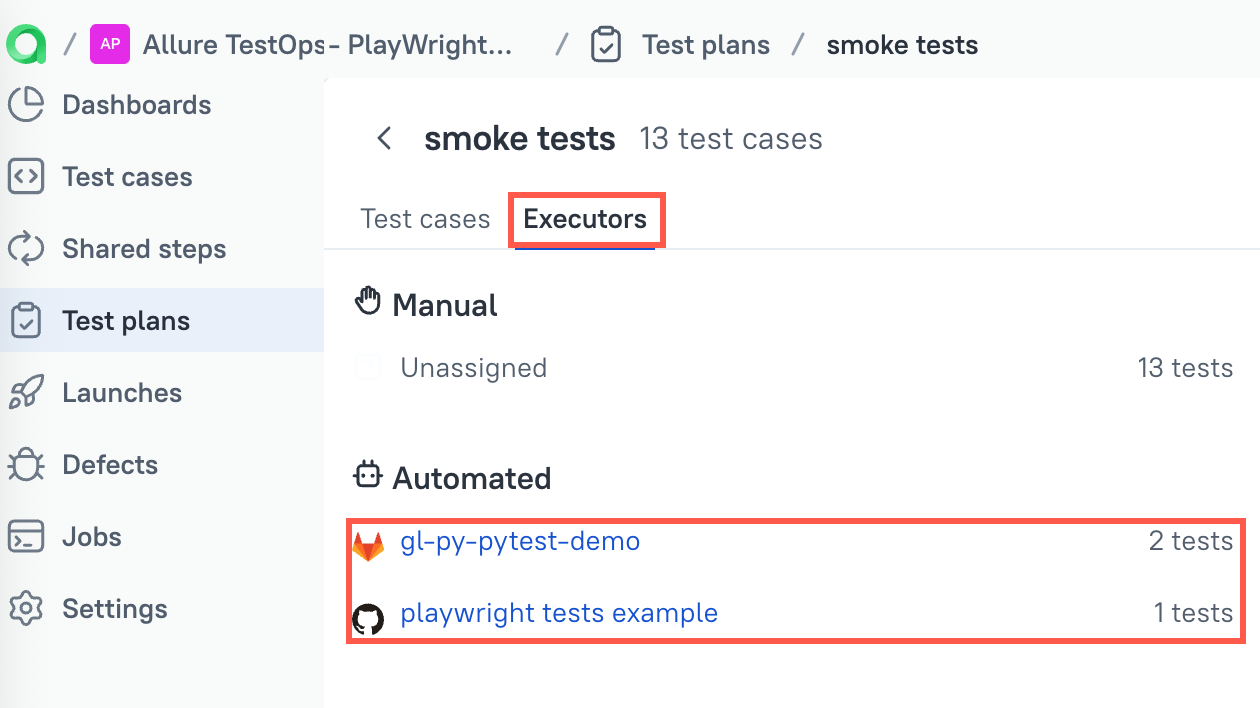
- The scope already knows which automated parts belong to which job through the plan's Executors tab or earlier job mapping.
- Allure TestOps creates one launch.
- The platform creates the necessary job runs inside that launch.
- Each connected job reports back into the same launch automatically.
Prerequisites
- Your tests must be executed at least once from the pipeline side and such launch must be closed.
- Integration with a CI must be configured for bi-directional work.
- Integration with CI must be added.
- Job for the pipeline must be configured and integration from 2.1 must be added to the Job as a build server.
- Job must be marked as "Job can be used to run tests"
Scope definition
There are two common ways to create the shared launch:
- In the test cases list select the tests you need, then use the action to run the tests.
- Create a test plan, that would contain all the tests.
Each automated test case is linked to the most recent job used to upload its result, and the Executors tab lets you override or refine those assignments for the plan.
In a test plan, the Executors tab contains the information about which job should execute which automated subset.
Execution
When you run the selected scope, Allure TestOps opens the launch creation form. There you can add metadata such as tags, issue links, and environments that will help you find and analyze the resulting launch later.
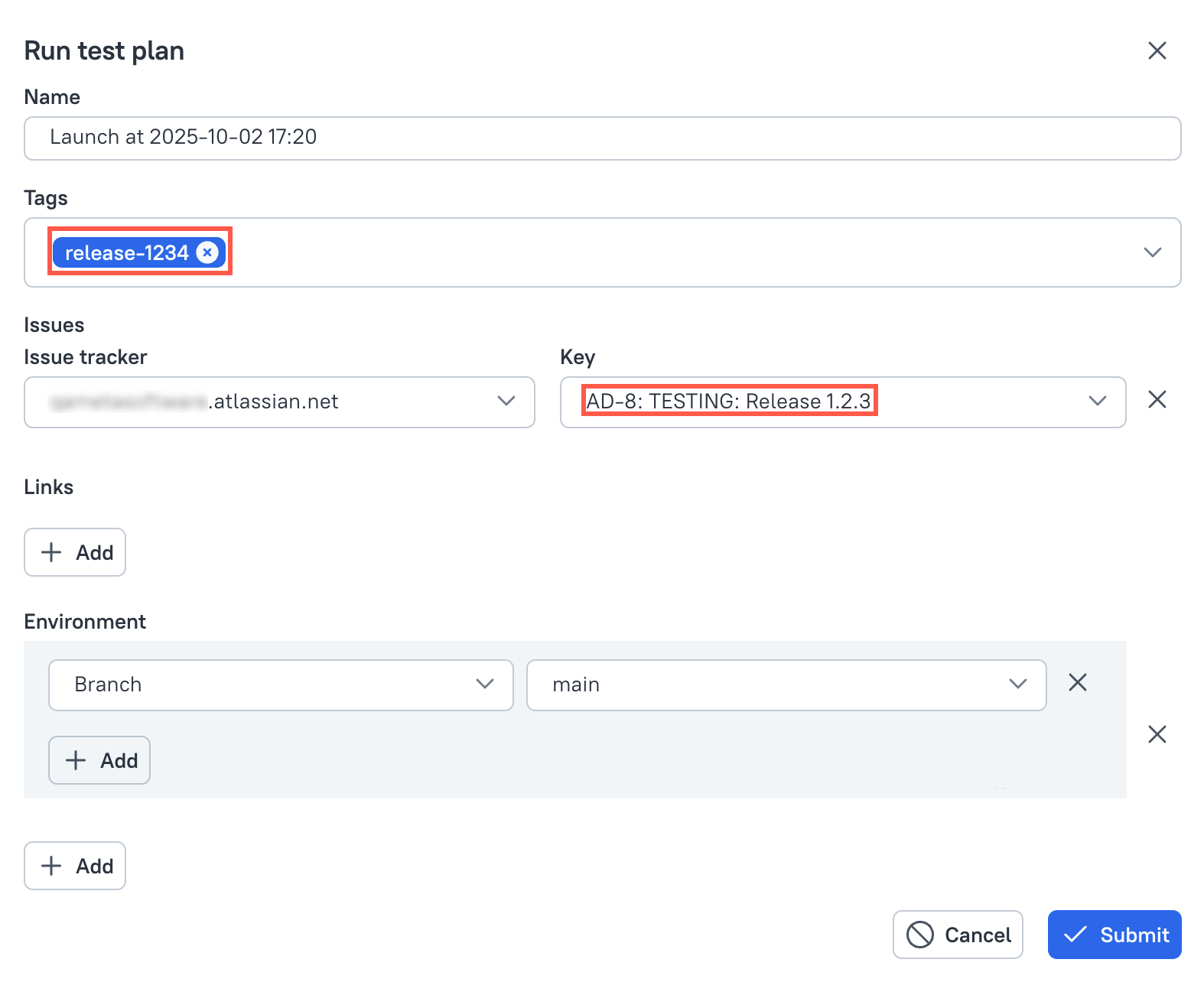
Allure TestOps then creates one launch and the required job runs inside it. Each connected CI job reports into that same launch without any extra pipeline-side consolidation logic.

Use this pattern when
- the team already uses plans or selected scopes in Allure TestOps;
- different automated subsets belong to different jobs;
- you want one launch to hold the whole verification story for the current task.
Caveats
- If pipelines can be started from Allure TestOps, prefer the TestOps-led pattern over the CI-led one.
- Manual test results can coexist with automated results in one launch, but manual results are not part of job runs.
- Keep one shared launch tied to one real decision scope, such as one release candidate or one validation window. Do not use it as a permanent sink for unrelated runs.
Next steps
- Create combined launches if manual and automated work should also live in the same launch.
- Launches for review and reruns.
- Jobs for job configuration and parameters.
