
Allure TestOps Documentation
What is Allure TestOps
Allure TestOps is an actionable reporting platform and test management system built around automation, with manual QA as a first-class part of the process. It standardises and extends reporting with high-load storage, uniting automated and manual tests in one workspace: the source of truth for analytics and the place where QA workflows live.
Allure TestOps builds on Allure Report as an open reporting standard: free, framework-agnostic, and useful on its own, with or without Allure TestOps.
Because the Allure standard stays open, Allure TestOps fits into existing QA infrastructure instead of locking teams into a closed stack. It connects CI/CD, code, issue trackers, and TMS tools, centralizing quality data without proprietary vendor dependencies.
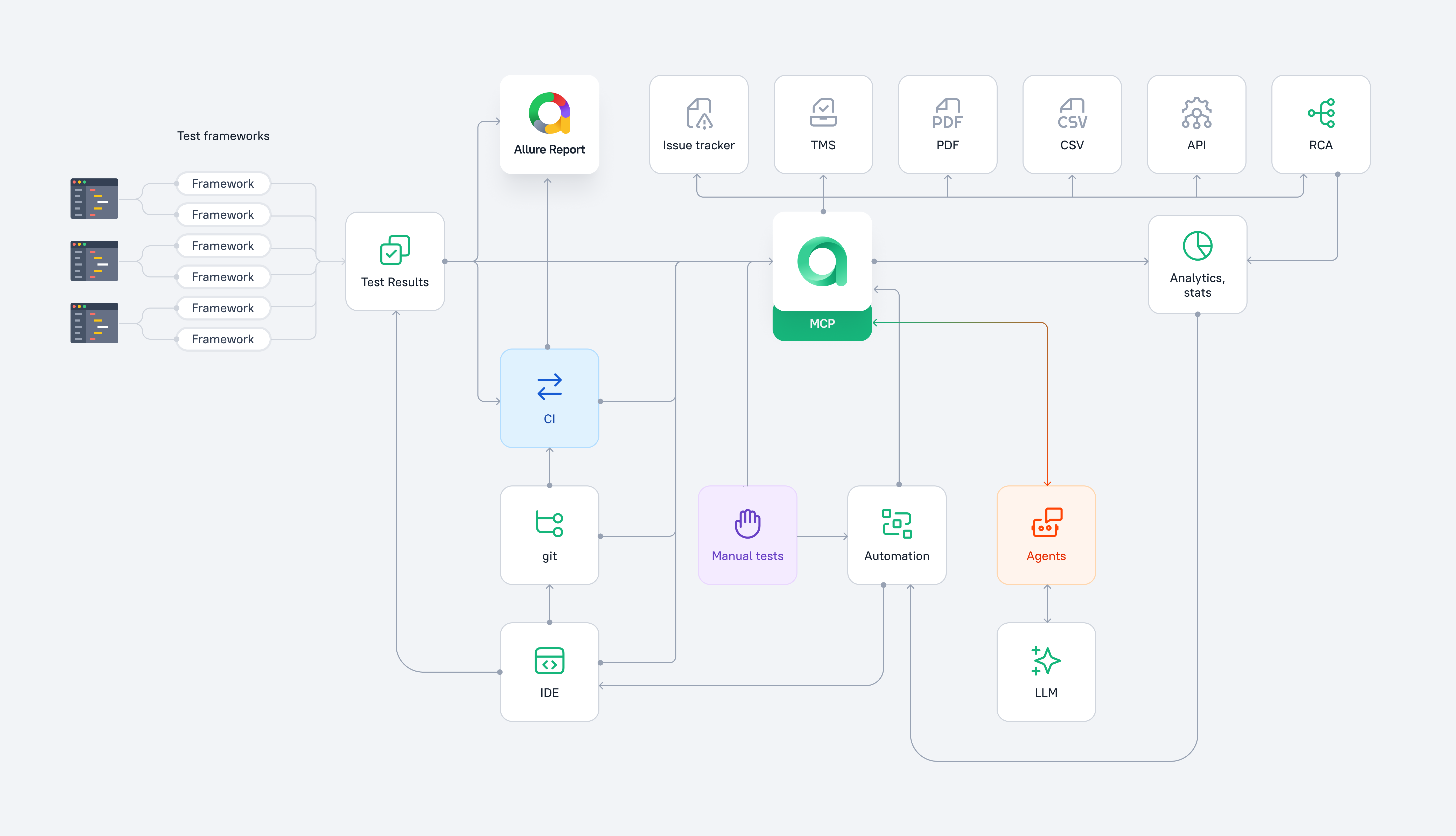
Core capabilities
Centralisation and observability
- Single workspace for manual and automation QA
- Self-updating test documentation generated from execution data
- Real-time and technology-agnostic visibility for automated tests
- Unified report for manual and cross-pipeline automated tests
Data source for analysis and decision making
- Instant status evaluation and long-term historical trend analysis
- Accelerated test result triage through automatic failure grouping, known-issue detection, and flaky test detection
- Complete context for root cause analysis, including history, environment, attachments, full logs, and CI/CD metadata
Accelerated workflows and operational overhead reduction
- Deep integrations for reduced context switching and manual handoffs
- Automatic test documentation generation from test code
- Automatic test code generation from test cases
- Selective and transparent test reruns
Terms and concepts
If you are coming from another TMS, new terms can slow you down. Allure TestOps uses its own words for some familiar entities and workflows. We recommend reading the terms and concepts page before you start — the list is short.
Getting started
Explore Allure TestOps from the starting point that fits your QA process. Each path starts with a short orientation page and then points to the hands-on tutorial.
Continue from Allure Report
If your team already uses Allure Report, start with Continue from Allure Report.
Learn how to turn your reports into centralized storage with deep history and flexible analytics, so tests become visible, understandable, and actionable for the whole team.
Connect automation to Allure TestOps
If your team has automated tests but does not use Allure Report yet, start with Connect Automation to Allure TestOps.
Learn how to standardise and centralize the existing automation without adding proprietary dependencies.
Move your data from a TMS
If you are moving test cases from another test management system, start with Move from a 3rd party TMS.
Start with test management
If automation is your next step, start with Start with test management.
Learn how Allure TestOps creates a manual-to-automation bridge and scales beyond thousands of tests.
Find your path in Getting started
How to
- Move reports to Allure TestOps — send results from CI/CD pipelines to Allure TestOps without losing metadata and execution context.
- Generate test documentation from automated tests — annotate test code and choose which fields are generated from code and which stay editable in Allure TestOps.
- Build quality gates — configure Allure Report quality gates in your pipelines and send the result to Allure TestOps.
Deployment and integrations
- On-Premises vs Cloud for choosing who operates the platform.
- Premium Cloud for the enterprise hosted offering.
- Self-Hosted if your team installs and operates Allure TestOps in its own infrastructure.
- Reference integrations for supported CI, issue tracker, and ecosystem integrations.
- Migration from other solutions for moving from another test management or reporting workflow.
- Automation compatibilities for the list of automation frameworks compatible with Allure out of the box.
- Release notes for current and historical product changes.
Usage reference and support
- Administer Allure TestOps if you manage users, permissions, governance, notifications, integrations, or identity behavior.
- Use Allure TestOps for day-to-day project workflows after the first evaluation works.
- FAQ for short answers to common product questions.
- Troubleshooting for symptom-based help with installation, integrations, result ingestion, test cases, analytics, and Cloud limits.
Deep dive
Go deeper into the mechanics behind Allure TestOps: how results get uploaded, how launches become useful for triage, how projects stay organized, and how metadata governance keeps automation and manual work aligned.
Execution and CI/CD
- allurectl explains how the CLI uploads results, streams data from CI, supports selective execution, and passes launch context between Allure TestOps and the pipeline.
- Run automated tests explains how automated execution works in Allure TestOps, from manual upload to CI-driven launches.
Failure analysis
- Launches shows where teams review results, rerun selected tests, close execution windows, and move results into history.
- Defects explains how known failures, automation rules, linked issues, and triage queues help teams handle recurring problems efficiently.
- Troubleshooting routes common symptoms across ingestion, integrations, test cases, analytics, Cloud limits, and support escalation.
Structure and metadata
- Projects and collaboration explains how to organize teams, access, test cases, launches, dashboards, and integrations.
- Project trees explains how metadata-driven navigation helps teams work with large test bases.
- Tags, labels, layers, and custom fields explains how report metadata becomes Allure TestOps structure.
- Metadata update settings explains which fields are owned by code and which stay managed in Allure TestOps.
Manual-to-automation bridge
- Automate manual tests explains how manual cases connect to automated code with Allure IDs.
- Generating code for test case automation shows how Allure TestOps can create automation templates from existing test cases.
Extensibility and AI
- API explains programmatic access to Allure TestOps data and supported API boundaries.
- Test management sync and export explains external TMS exchange, outbound export, and identity linking.
- MCP server shows how AI agents and automation tools can work with Allure TestOps through the MCP contract.
