
Is there an official MCP server available and how to use it?
Yes, starting from release 26.1.1 Allure TestOps has its own built-in MCP server that can be used with a number of tools that can act as an AI agent.
Note: MCP is available in Allure TestOps from release 26.1.1 as a public beta feature. This feature may be subject to additional fees in future releases.
What is MCP server
MCP server is a set of actions/tools that can be executed/used by an AI agent based on end user prompt.
What tools has Allure TestOps server
For the time being MCP server has 13 tools including the following ones:
Test Cases
testops_create_testcase— create a test case with full metadata (steps, tags, custom fields, links, etc.)testops_update_testcase— update an existing test case (partial updates supported)testops_find_testcases— search test cases via AQL with pagination and field expansiontestops_delete_testcase— move a test case to trashtestops_restore_testcase— restore a test case from trash
Shared Steps
testops_create_sharedstep— create a reusable shared step with scenariotestops_update_sharedstep— update an existing shared steptestops_find_sharedsteps— search shared steps via AQL with pagination
Test Results
testops_find_testresults— search test results via AQL with pagination and expansion
Mutes
testops_create_mute— mute a test case (suppress failures)testops_delete_mute— remove a mute from a test case
Projects
testops_get_project— get project details with optional expansion (collaborators, custom fields, workflows, integrations, test layers, etc.)
Issue Integration
testops_get_issue_details— fetch issue data from an external tracker (e.g. Jira) by key
How do I connect to Allure TestOps MCP server?
Requirements
To be able to work with Allure TestOps MCP server you need to have installed NodeJS at least version 18 (see the requirements at https://github.com/geelen/mcp-remote)
VSCode
VSCode stores MCP servers data in the file mcp.json that can be usually found in different OS as described below.
- MacOS:
"/Users/${USER}/Library/Application Support/Code/User/mcp.json" - Windows:
%APPDATA%\Code\User\mcp.jsonwhich usually resolves to something likeC:\Users\<USER>\AppData\Roaming\Code\User\mcp.json - Linux:
~/.config/Code/User/mcp.json
Configuration
Configuration is added to the file mcp.json under object servers:
{
    "servers": {}
}
Configuration is thoroughly described by the developer of mcp-remote here.
To add Allure TestOps MCS server create the following record.
{
    "servers": {
        "allure-testops-mcp": {
            "type": "stdio",
            "command": "npx",
            "args": [
                "mcp-remote",
                "https://url.of.testops/api/mcp",
                "--header",
                "Authorization: api-token ${AUTH_TOKEN}"
            ],
            "env": {
                "AUTH_TOKEN": "TOKEN-TOKEN-TOKEN-HERE"
            }
        }
}
Alternatively, you can store the MCP endpoint as a variable and use the following configuration
{
    "servers": {
        "allure-testops-mcp": {
          "command": "sh",
          "args": [
            "-c",
            "npx mcp-remote ${MCP_ENDPOINT} --header \"Authorization: api-token ${AUTH_TOKEN}\""
          ],
          "env": {
            "AUTH_TOKEN": "TOKEN-TOKEN-TOKEN-HERE",
            "MCP_ENDPOINT": "https://url.of.testops/api/mcp"
          }
        }
    }
}
The generation of the API token is described here.
Then save and restart VSCode.
Starting and using Allure TestOps MCP server in VSCode
When MCP server is added application is restarted and the configuration is correct (sic!) in terms of JSON formatting and structure, the added MCP servers will appear in the same side Bar item as Extensions.
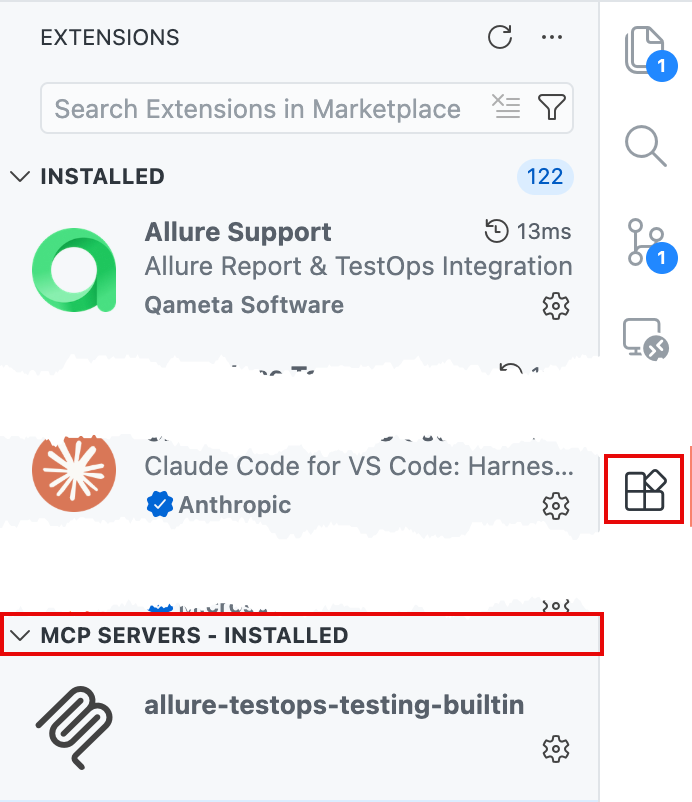
Right click the installed MCP, select Start Sever.
VSCode will redirect the output to VSCode output section of the UI, you will be able to see all actions and (if any) errors related to the start of the MCP server.
Cursor
Cursor stores MCP servers data in the file mcp.json.
Configuration
- Go to Cursor → Settings → Cursor Settings
- In the left-side Settings menu select Tools & MCP and press Add Custom MCP
- This will open the MCP configuration file under the folder where Cursor is located
- Usually it's
~/.cursor/mcp.json
- Usually it's
- If this is the 1st MCP server you are about to add, the file looks like this
{
  "mcpServers": {}
}
Otherwise, there are child objects under the mcpServers object - leave them as is and create a new node
{
  "mcpServers": {
    "allure-testops-mcp": {
            "type": "stdio",
            "command": "npx",
            "args": [
                "mcp-remote",
                "https://url.of.testops/api/mcp",
                "--header",
                "Authorization: api-token ${AUTH_TOKEN}"
            ],
            "env": {
                "AUTH_TOKEN": "TOKEN-TOKEN-TOKEN-HERE"
            }
    }
  }
}
- Alternatively, you can store the URL and the token in the ENV variables and explicitly configure the script
{
  "mcpServers": {
    "allure-testops-testing-builtin": {
          "command": "sh",
          "args": [
            "-c",
            "npx mcp-remote ${MCP_ENDPOINT} --header \"Authorization: api-token ${AUTH_TOKEN}\""
          ],
          "env": {
            "MCP_ENDPOINT": "https://url.of.testops/api/mcp",
            "AUTH_TOKEN": "TOKEN-TOKEN-TOKEN-HERE"
          }
        }
  }
}
The generation of the API token is described here.
- Save the mcp.json file
- Go back to the Cursor settings and enable the tool.
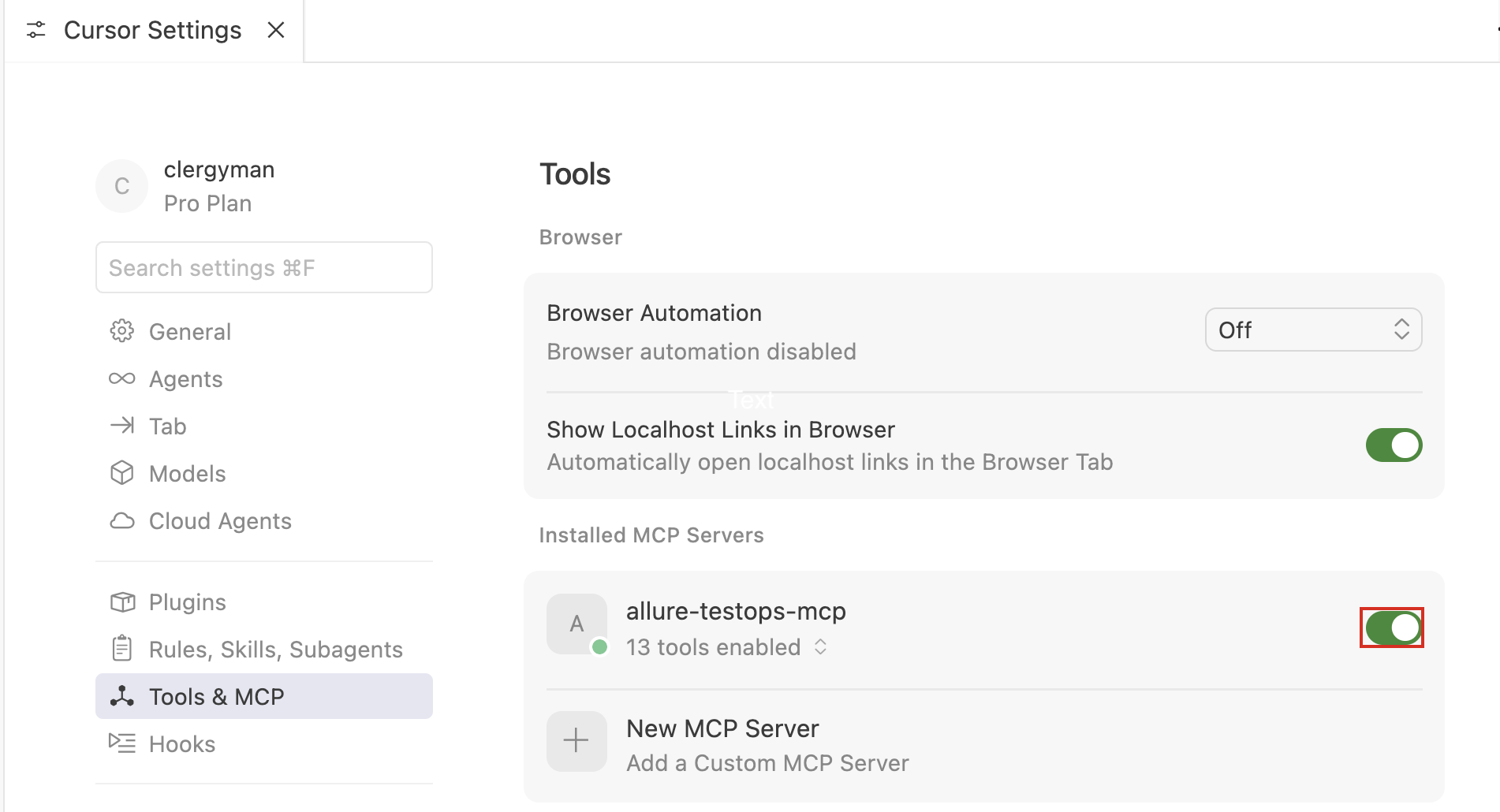
Now you can work with Allure TestOps MCP server.
Claude desktop
Claude desktop stores its configs in the file claude_desktop_config.json.
To add Allure TestOps MCP server configuration to this file you need to do the following.
- Open Claude desktop settings.
- Go to Desktop app → Developer section.
- Click Edit Config button.
- Claude desktop will open the folder where claude_desktop_config.json is stored and will also focus the file in the folder.
- Use your favourite text editor and add Allure TestOps MCP server configuration as follows.
{
  "globalShortcut": "",
  "mcpServers": {
    "allure-testops-mcp": {
      "command": "npx",
      "args": [
        "mcp-remote",
        "https://url.of.testops/api/mcp",
        "--header",
        "Authorization: api-token ${AUTH_TOKEN}"
      ],
      "env": {
        "AUTH_TOKEN": "TOKEN-TOKEN-TOKEN-HERE"
      }
    }
  },
  "preferences": { // leave as it is  }
}
The generation of the API token is described here.
- Save the file
- Restart the application
Claude Desktop will automatically start the server.
IntelliJ IDEA
Please follow these steps:
- Open Settings in IntelliJ IDEA.
- Go to Tools and find the AI Assistant module.
- Inside the AI Assistant settings, find the section related to MCP configuration.
- Click the + button to add a new MCP configuration.
- In the window that opens, select Type: command.
- Fill in the fields as follows: Name: any name you prefer Command: npx Arguments: mcp-remote https://your-instance-url/api/mcp --header "Authorization: api-token your-testops-api-token"
- Click OK
- Click Apply to save the configuration.
After that, the MCP server should become available for use in your AI Assistant.
